Learn
Agent-first vs website builders, low-code and DIY cloud: the 6 kinds of platform in 2026
In 2026 there are six ways to build and run what a business puts online: raw cloud, code hosts, website builders, visual builders, prompt-to-app builders and agent-first platforms. They differ on two questions. Who builds it? And who provides the parts every real site and app needs, like sign-in, a database, backups and protection from bots? Agent-first platforms are the newest kind: your own AI coding agent writes ordinary code, and the platform provides the rest, for your website, your shop, your customer portals and the tools behind them.
The names in this market are a mess. "Website builder", "low-code", "no-code", "AI app builder", "vibe coding", "platform as a service" and "serverless" all get used for overlapping things, and most of them describe how a product is sold.
They also split one business across several platforms. The website goes on one platform, the shop on another, the customer portal on a third and the team's tools on a fourth, even though a quote request on the website, an order in the shop and the job on the workshop floor are all the same piece of work.
So here's a simpler map, with plain names, built around the two questions that decide what your week looks like.
The map
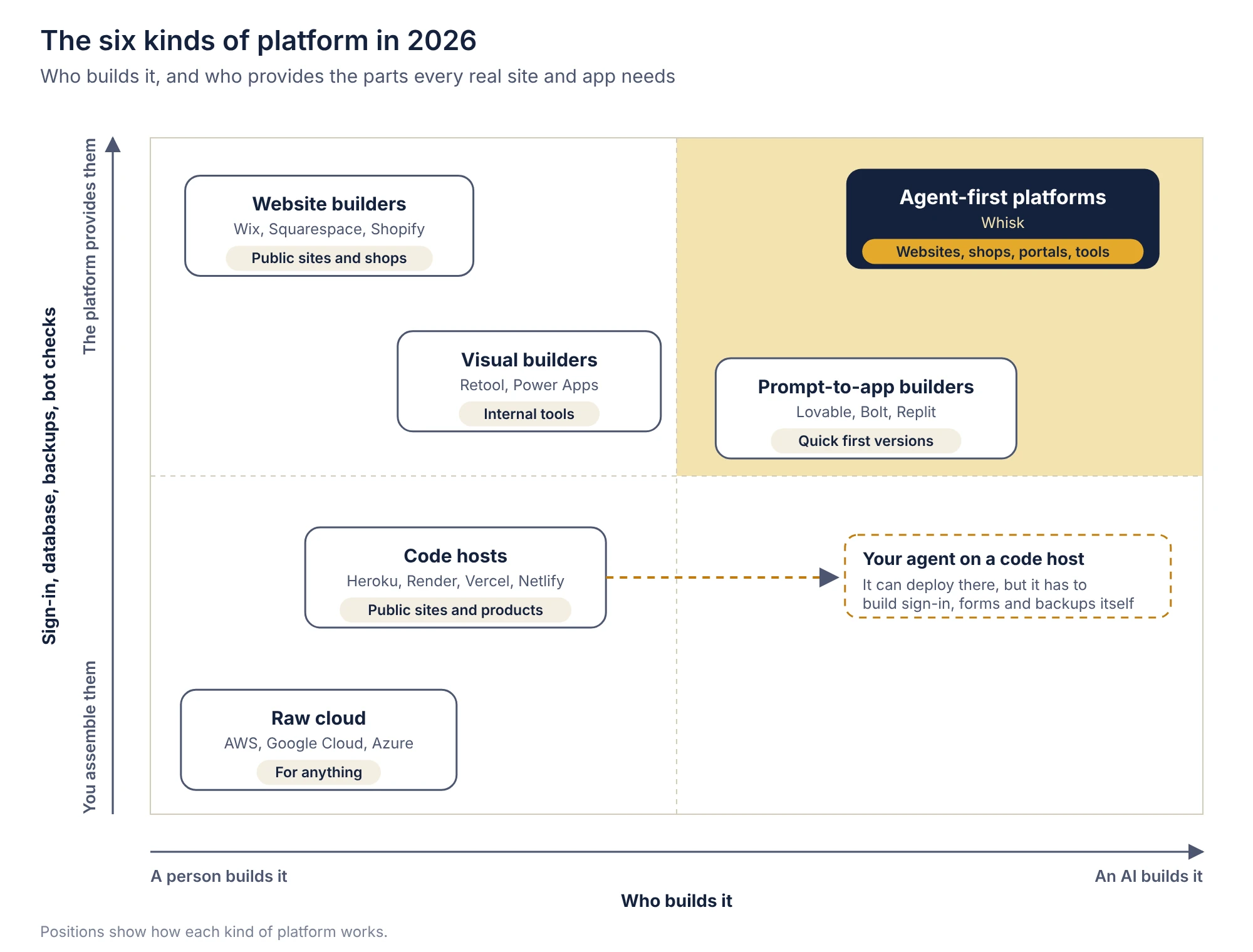
Across the bottom are the places you can run anything, as long as you assemble it. Raw cloud and code hosts run code from any source, including code your AI agent wrote. But sign-in, backups, scheduled jobs, bot protection and secret keys are yours to add, one service at a time.
Along the top are platforms that provide those parts for you. They differ in who does the building, and in what they're for. Website builders do public sites and shops. Visual builders do internal screens. Prompt-to-app builders do a bit of everything, quickly. Agent-first platforms are the only kind built to run all of it, as code your own agent writes.
The six kinds
1. Raw cloud
Examples: AWS, Google Cloud, Microsoft Azure, a rented server.
You get computers, storage and networks, and you build everything else. It's the most flexible option and the most work. Even a simple website with a contact form on raw cloud means a server, HTTPS certificates, a database, an email service, a bot check, backups and someone to look after all of it.
Best for: companies with engineers whose job is running infrastructure.
2. Code hosts
Examples: Heroku, Render, Fly.io, Railway, Vercel, Netlify. Often called "platform as a service".
You hand over your code and it runs. Web addresses, HTTPS and deploys are handled, and many are excellent at fast public websites. A database is usually an add-on. Sign-in, scheduled jobs that retry, forms that store their answers, and secrets handling are mostly yours to add or build, and each add-on has its own price.
Best for: developers shipping public products, APIs and marketing sites, who are happy to pick their own parts.
3. Website builders
Examples: Wix, Squarespace, Shopify, Webflow.
You pick a template and arrange it in the browser, and they host the result. Many have a shop with payments, stock and shipping built in, and Shopify is built around one. They're the easiest way to a good-looking public site. The trade-off is that the site lives inside the builder, its forms land in the builder's inbox, and anything your team does with an order or an enquiry happens somewhere else.
Best for: a brochure site or a shop that doesn't need to connect to how the business works.
4. Visual builders
Examples: Retool, Microsoft Power Apps, Appsmith. Often called "low-code".
A person builds screens in a drag-and-drop editor, on top of databases and systems you already have. Sign-in and hosting come with it. The trade-off is that the app only runs on that platform, it's mostly for your own staff, and you usually pay for each person who uses it.
Best for: teams that already have their data in place and want internal screens over it, built by an analyst or IT team.
5. Prompt-to-app builders
Examples: Lovable, Bolt, Replit, v0. Often called "vibe coding" tools.
You describe a site or app in a chat on the vendor's website, and its AI builds it while you watch. Many now host the result too, with a database and logins. They're the fastest way from an idea to something you can click, and they're popular for landing pages and first versions. The building happens in their tool, with their AI, and hosting is usually priced in the same credits as the building.
Best for: prototypes, landing pages and first versions you want to see this afternoon.
6. Agent-first platforms
Example: Whisk.
Your own coding agent, the one you already use, such as Claude Code, Codex, Cursor or Gemini CLI, writes the site or app as ordinary code in your own repository. The platform provides what it needs to run in public and in private: HTTPS on your own domain, sign-in for your team and your customers, a database, backups, bot checks on public forms, scheduled jobs, workflows, secrets and email. It's built to be used by the agent: it publishes instructions the agent reads, checks the agent's work before every deploy, and keeps decisions about access, money and secret keys with a person.
What runs on it: your company website, your online shop, customer portals, booking and ordering pages, and the tools your team uses behind them, side by side on one platform and one bill. A quote request on the website can land straight in the app your sales team works in.
Best for: everything a business runs online that it wants to own, built with AI, and relied on for years.
Agent-first platform: a hosting platform designed for AI coding agents to deploy and run websites and apps. It provides the production parts every site and app needs, publishes instructions the agent reads, checks the agent's work before it goes live, and keeps decisions about who has access, what is paid and what the secret keys are with a person.
What each kind is for
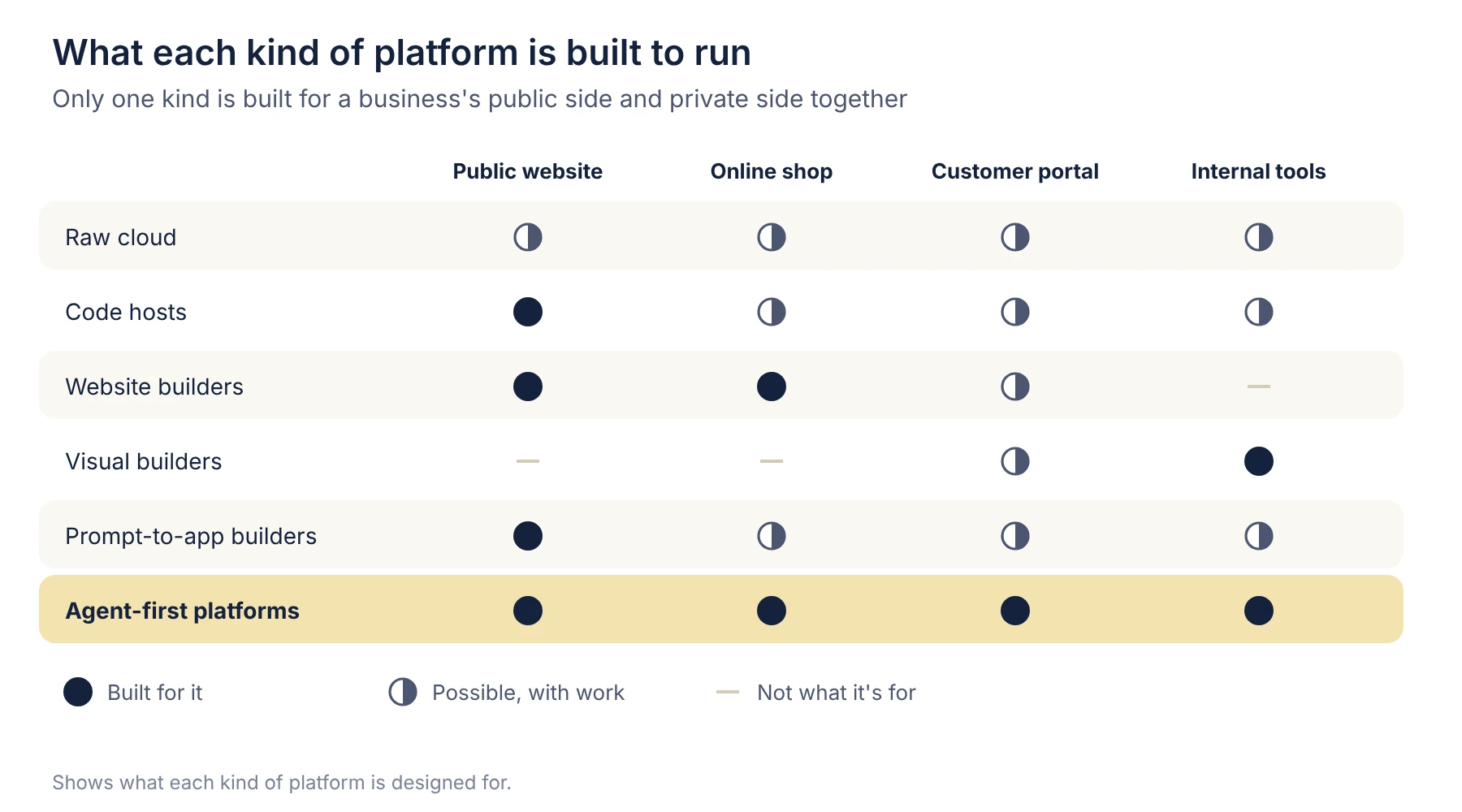
Side by side
| Raw cloud | Code hosts | Website builders | Visual builders | Prompt-to-app builders | Agent-first platforms | |
|---|---|---|---|---|---|---|
| Who builds it | Your developers | Your developers or your AI agent | A person, dragging blocks | A person, in a visual editor | The vendor's AI, in its website | Your own AI agent |
| Built for | Anything | Public sites and products | Public sites and shops | Internal tools | Prototypes and first versions | Websites, shops, portals and internal tools |
| What you end up with | Code you own | Code you own | A site inside the builder | Screens that run only there | Code, often synced to GitHub | Code you own, in your repository |
| Your own domain with HTTPS | You set it up | Included | Included | Some plans | Paid plans | Included |
| Forms that save their answers | You build them | You build them | To the builder's inbox | n/a | Varies | To the app's own database, with a bot check |
| Sign-in for your team | You add it | You add it | Member areas, limited | Included | Often included | Included |
| Sign-in for customers | You add it | You add it | Member areas, often extra | Usually extra, often per person | Often included | Included |
| Database | Managed service you set up | Usually an add-on | Theirs, for the site | Theirs, or yours connected | Usually included | Included, one per app |
| Backups you can restore yourself | You set them up | Depends on the add-on | Site history | Limited | Varies | Included |
| Scheduled jobs that retry | You build them | Basic scheduler, or you build it | No | Some | Rarely | Included |
| Checks before each deploy | You build them | Your own tests | n/a | n/a | Few | Built in |
| How you pay | Per resource used | Per server or seat, plus add-ons | Per site | Per person | Credits | Per live app |
| Leaving | Easy, it's yours | Easy | Hard, rebuild elsewhere | Hard, rebuild elsewhere | Code yes, data by hand | Easy, export code and data |
What it costs
Pricing models matter more than list prices, because what grows in a business is usually its people and the number of things it runs.
A whole small business online
Here's a typical small business: a website, an online shop, and three tools for a team of 20. Prices are list prices in US dollars in October 2026, billed yearly, at each vendor's lowest plan that does the job.
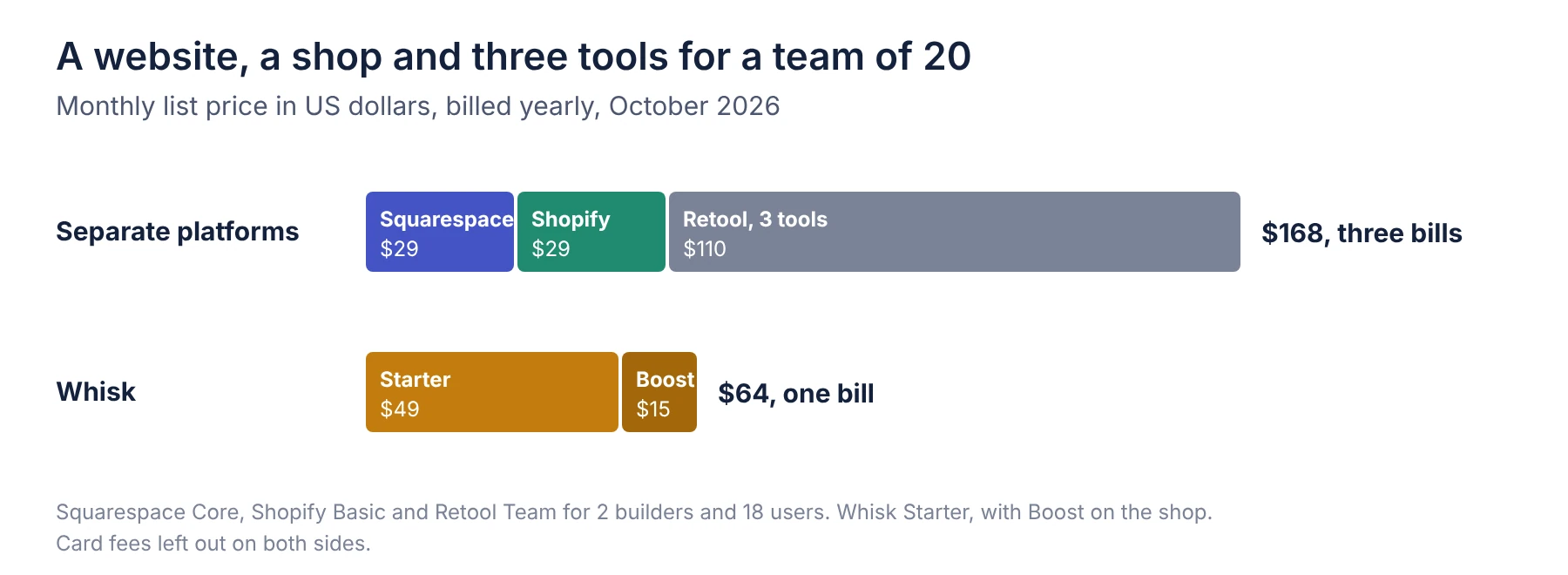
| Separate platforms | Whisk | |
|---|---|---|
| Website | Squarespace Core, $29 | Starter, $49, covers all three |
| Online shop | Shopify Basic, $29 | Boost on the shop's app, $15 |
| Three tools, 20 people | Retool Team, $110 | Included |
| Each month | $168 | $64 |
| Bills and logins to manage | Three | One |
Card fees for the shop are left out on both sides. Whisk's Starter covers 10 live apps, so the same $64 also covers a customer portal and four more tools. On separate platforms, a customer portal means Retool's Business plan or another product.
As your team grows
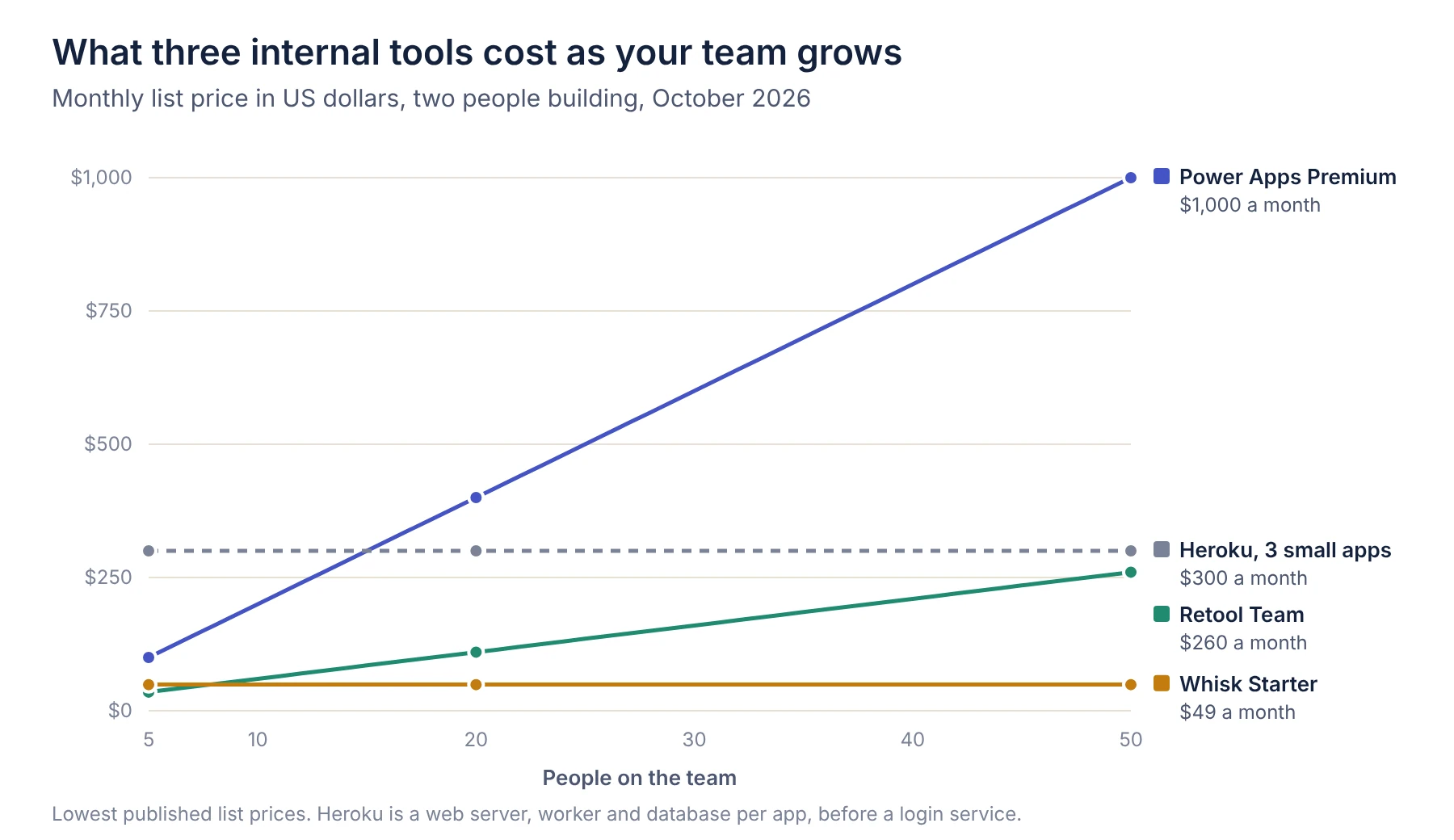
Now just the three internal tools, built by two people, for a team that grows from 5 to 50.
| Team size | Power Apps Premium, per person | Retool Team, per builder and user | Heroku, 3 small apps | Whisk Starter |
|---|---|---|---|---|
| 5 | $100 | $35 | about $300 | $49 |
| 20 | $400 | $110 | about $300 | $49 |
| 50 | $1,000 | $260 | about $300 | $49 |
A few things are left out to keep it fair. Power Apps may already come with a Microsoft plan you pay for. Retool's Team plan doesn't let customers sign in; that needs Business, from $15 a month per user. Heroku's figure is a web server, a worker and a database for each app, and doesn't include a login service. Prompt-to-app builders are left off because their credits depend on how much you build.
The pattern is the point. Per-person pricing punishes the thing you want, which is more of your team and your customers using what you've built. Per-server and per-site pricing punish having many small things. Per-app pricing with unlimited people is the only model where a growing business costs nothing extra.
Which one fits
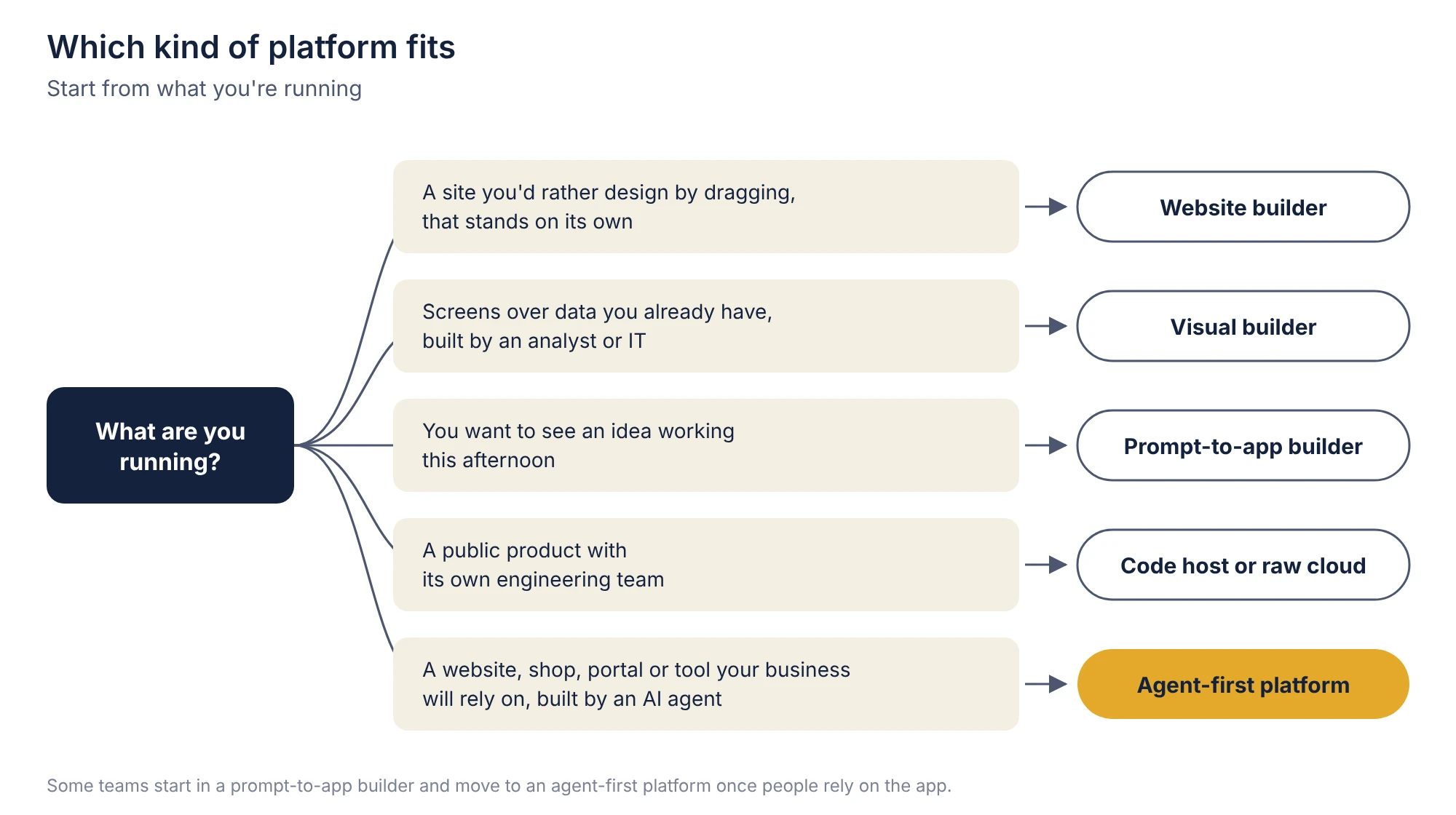
Many businesses use more than one kind. Some build the first version of something in a prompt-to-app builder and move it to an agent-first platform once people rely on it. Lovable, for example, keeps the code in your own GitHub, so your coding agent can pick it up from there. And a website on a builder can be recreated as code by your agent, page for page and address for address, so search engines don't lose it.
What doesn't work well is running something in a place that was designed for something else: a prototype tool asked to hold real customer data, a website builder asked to run the business behind the website, or a raw server asked to look after itself.
Why the agent-first corner is new
Two things had to be true for agent-first platforms to make sense.
Coding agents had to get good enough to build whole sites and apps. In Stack Overflow's 2026 survey, two thirds of developers who use AI were using coding agents, and 73% of people using AI coding assistants or agents used them every day. Agents that read a codebase, run commands and fix their own mistakes have become everyday tools, and increasingly for people who aren't developers at all.
Someone had to notice that the agent is the platform's real user. Most hosting still assumes a person reading docs and clicking dashboards, and most website builders assume a person dragging blocks. An agent-first platform is designed the other way round: the instructions, the command line, the checks and the error messages are written for the agent first, and the dashboard is where people make the decisions only people should make.
That's what Whisk is built for: put what you build with AI online, from your website and your shop to your customer portals and the tools behind them. The guide to agent-first deployment walks through it step by step.