Learn
What is agent-first deployment? A 2026 guide
Agent-first deployment means the hosting platform is built for the AI agent that writes and ships the code. The agent reads the platform's instructions, runs its checks, fixes what they find and deploys. A person steps in only for the few decisions a person should make: who the agent works for, what the secret keys are, and who can open what isn't public.
In 2026 a lot of what businesses put online is written by coding agents like Claude Code, Codex, Cursor and Gemini CLI: company websites, online shops, customer portals, booking pages and the tools a team uses behind them. Most hosting was designed before that. It assumes a developer who reads the docs, clicks through a dashboard, sets up a login system and remembers to turn on backups.
An agent can do most of that work when the platform is built to be used that way. This guide explains what that means, what it looks like from start to finish, and how to tell whether a platform really works like this.
The short version
| Developer-first hosting | Agent-first hosting | |
|---|---|---|
| Who reads the instructions | A person, in docs written for people | The agent, at one address it can fetch |
| How work gets done | A dashboard, plus a command line for some things | A command line and an API for everything an agent may do |
| How mistakes are caught | In production, by a person | By checks the agent runs before it deploys |
| What an error says | What went wrong | What went wrong, and the exact next step |
| What the agent can touch | Whatever the key it was given can touch | Deploys and code; never secrets, money or who has access |
| Where sign-in, the database and backups come from | You add them yourself | They're part of the platform, and the agent plugs into them |
Why it matters now
Coding agents write working code quickly. The hard part is everything between "it works on my laptop" and "my team uses it every day": a web address, sign-in for each person, a real database, backups, scheduled jobs, somewhere safe for passwords and keys, and a way to undo a bad change.
When the platform leaves those to you, the agent has to invent them in every app, every time. It might store passwords in a table it wrote itself, put an API key in the code, or keep the data in a file that disappears when the server restarts. Each app ends up with its own homemade version of the parts that matter most.
Agent-first deployment flips that around. The platform provides those parts once, properly, and teaches the agent to use them. The agent does what it's good at, which is writing the site or app. The platform does what shouldn't be improvised.
Websites, shops and customer portals
A company website, a shop and a customer portal are apps too. They need the same parts as a team's tools, plus a few of their own: HTTPS on your own domain, pages served fast to people who've never heard of you, forms protected from bots, and redirects so search engines keep finding you after a move.
On Whisk every page is private until the app lists it as public, so one app can be a public website at the front and the staff pages that handle its enquiries at the back. Here's what people put online this way:
| What it is | What the public sees | What stays private |
|---|---|---|
| Company website | Every page, and a quote form with a bot check | The page where staff pick up the quote requests |
| Online shop | Products, cart and checkout | The shop's admin, orders and stock |
| Customer portal | A sign-in page | Each customer's own orders, invoices and documents, and nobody else's |
| Booking page | Open times and a booking form | The calendar staff work from |
| Internal tool | Nothing | All of it, for the people you choose |
They all run side by side on one platform, so a booking made on the public page is already in the tool the team uses. Nobody copies it from one system to another.
The five parts of an agent-first platform
1. Instructions the agent reads first
An agent can't attend an onboarding call. It needs one document, at one address, that explains how an app works on the platform: where the database comes from, how sign-in works, how to declare a secret, how scheduled jobs run, and what not to do.
On Whisk that address is whisk.run/skill. It's about 1,400 lines of plain instructions, open source, and the same text the docs are made from, so people and agents read the same thing. The agent fetches it before it writes a line of code.
2. A command line the agent can drive
Agents work by running commands and reading what comes back. Anything that needs a mouse is a dead end for them. So every step of putting an app online is a command:
whisk login     approve this computer once
whisk init      describe the app in whisk.yaml
whisk doctor    check the app against the rules
whisk deploy    build it, check it's healthy, put it live
Each command can print JSON, so the agent reads each result exactly.
3. Checks the agent runs before it ships
A person learns a platform's rules over months. An agent needs them checked every time. whisk doctor reads the app's code and settings and reports anything that breaks a rule, with the file, the line and the fix. It runs again on every push, so a deploy can't skip it.
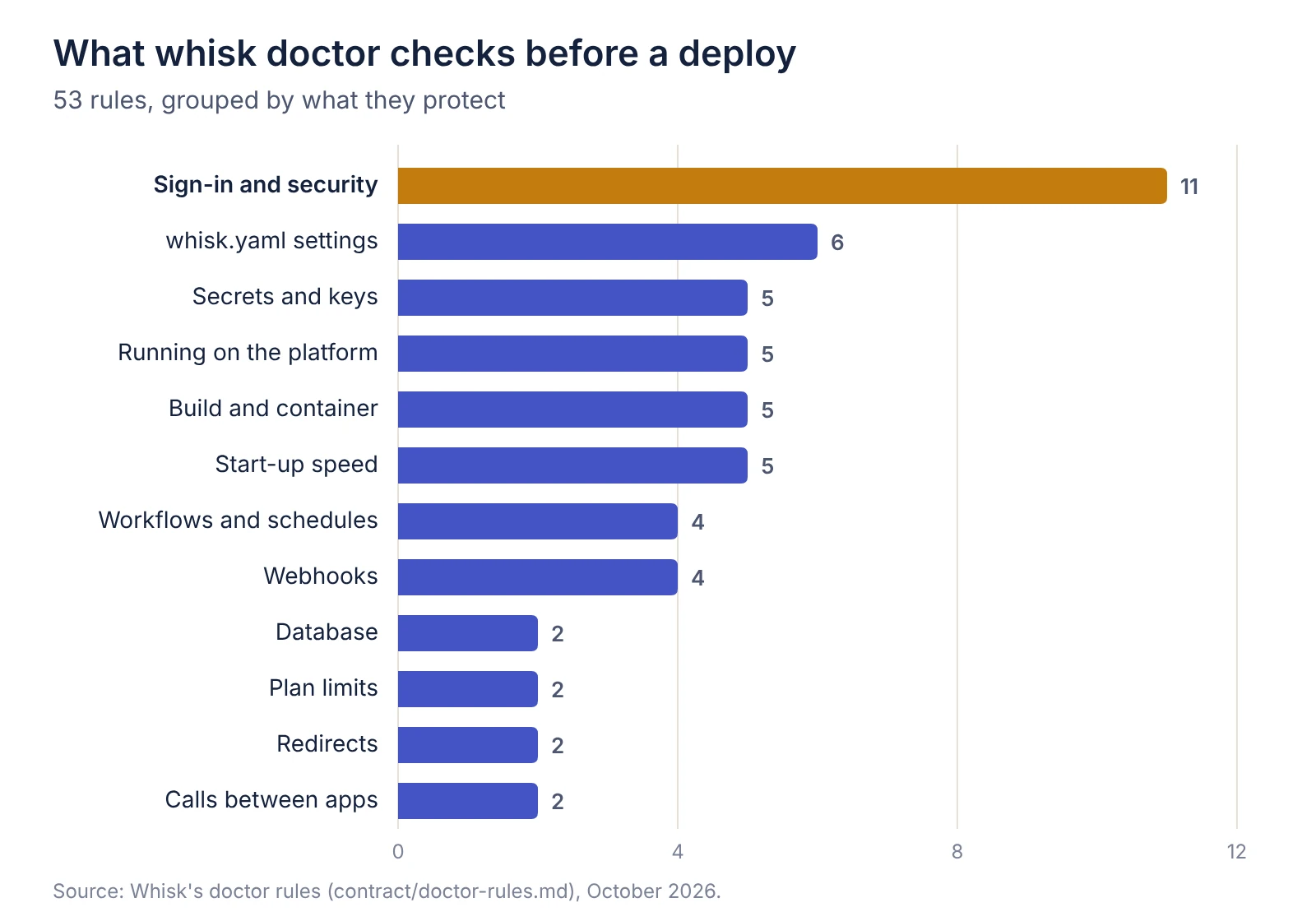
Doctor has 53 rules today. The biggest group is about sign-in and security, because that's where homemade code goes wrong most often: an app that draws its own password box, builds database queries by gluing text together, takes form posts from the public without a bot check, or forgets to limit customers to their own records. Others cover what public sites need, like redirects that work in one hop when a site moves.
A typical finding looks like this:
{"rule":"W030","level":"warning","file":"src/xero.ts","line":8,
 "message":"XERO_TENANT_ID is read from the environment but not declared.",
 "fix":"Add XERO_TENANT_ID under secrets or env in whisk.yaml."}
The agent reads the fix, makes the change, and runs doctor again until it passes. Nobody has to explain the rule to it.
4. Errors that say what to do next
Most error messages tell a person what went wrong and leave the rest to them. A person can search for it, ask a colleague or guess. An agent given a vague error tends to guess too, and its guesses can be confident and wrong.
Every Whisk error has a stable code, a sentence that says what happened, and a fix that says exactly what to do. There are 236 of them, each with its own page.
| A typical error | An agent-first error |
|---|---|
401 Unauthorized | AUTH_REQUIRED: This route requires a signed-in user. Fix: Navigate to /.whisk/login?return=/reports to sign in, or add the route to routes.public in whisk.yaml if it is meant for everyone. |
403 Forbidden | FORBIDDEN_ROLE: Setting a secret value needs the owner, admin or developer role; you are billing. Fix: Ask an owner, admin or developer of acme to set STRIPE_SECRET_KEY at its secrets page, or to change your role. |
The second column is longer, and that's the point. The agent can act on it without stopping to ask you.
5. A clear line between the agent and the person
This is the part that makes it safe. The agent gets everything it needs to build and ship. The things that decide who can see your data, what you pay, and what can't be undone stay with a person who is signed in.
| The agent can | Only a person can |
|---|---|
| Create apps and deploy them | Approve the agent in the first place |
| Read logs and errors, and fix them | Type in secret values like API keys |
| Declare which secrets the app needs | Invite people and decide who can open each app |
| Start a preview copy of a change | Change the plan or billing |
| Roll back to an earlier deploy | Export everything, or delete the business |
| Set up schedules, workflows and webhooks | Approve the agent on another computer |
The agent's login is approved by you in a browser, tied to the computer it ran on, and records that it is acting for you. If it tries something on the right-hand side, the platform refuses and tells it to ask you.
What it looks like from start to finish
Here's a real run. A person at a roofing company in Denver has a job tracker that Claude Code built on their laptop. They want the office to use it. Every step of this run, with screenshots, is in the guide to deploying a Claude Code app to production.
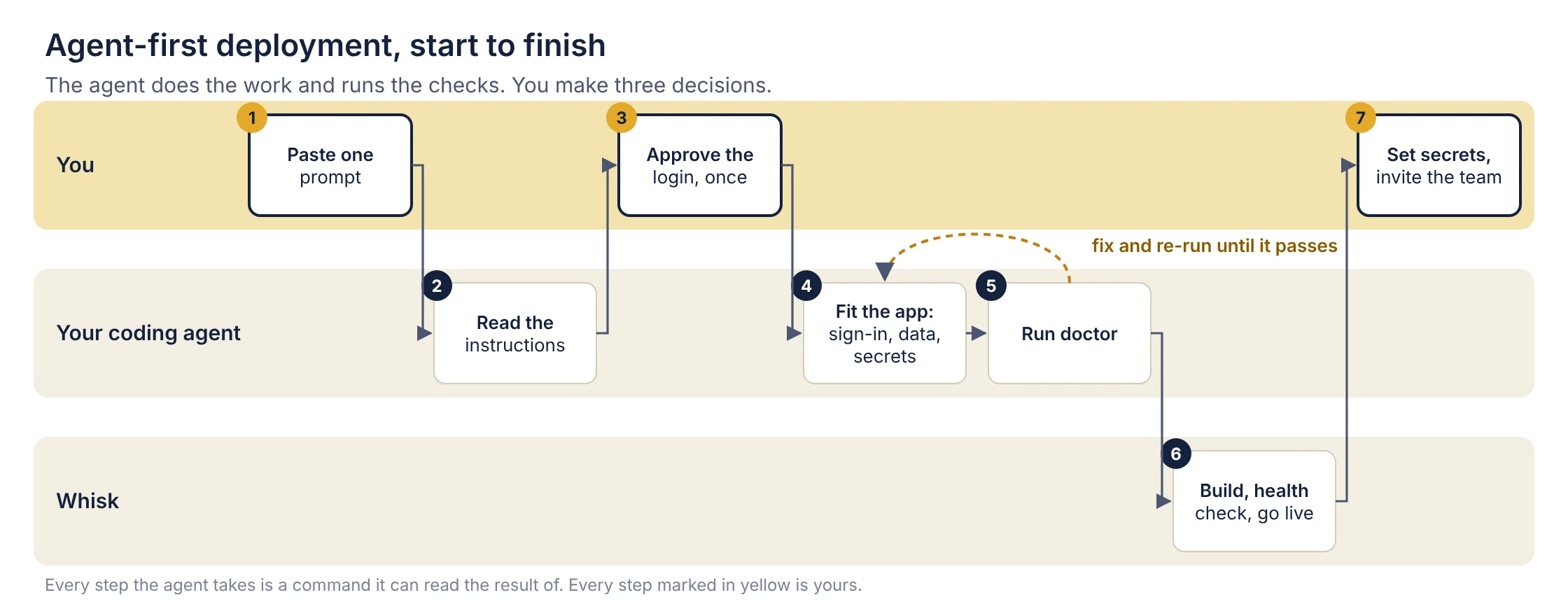
- They paste one prompt. "Read whisk.run/skill and deploy this app to Whisk."
- They approve one login. The agent runs
whisk loginand shows a short code. They open the link, sign in and approve it. That takes about a minute, once per computer. - The agent fits the app to the platform. It takes out the app's own login screen, because Whisk signs people in before they reach the app. It moves the data from a file into the app's Postgres database. It takes the QuickBooks key out of the code and lists it as a secret.
- The agent runs doctor until it passes. The first run finds four problems. The agent fixes them and runs it again.
- The agent deploys. Whisk builds the app, starts the new version beside the old one, and only switches over once it answers its health check.
- The person sets the secret. The agent gives them a link that opens the app's secrets page with
QUICKBOOKS_CLIENT_SECRETalready named. They paste the value. The agent never sees it. - The person invites the office. Each person signs in as themselves. The app's own code never handles a password.
The person did three things. The agent did everything else, and everything it did was checked.
A website goes the same way. Asked to move a company site off a website builder, the agent recreates every page as code, keeps every page address so search engines don't lose them, checks the copy matches the original, and deploys it. The person's decisions are to approve it and to point the domain at the new site.
What happens when the agent gets it wrong
Agents make mistakes, so agent-first deployment makes mistakes cheap.
- A deploy that fails its health check never goes live. The previous version keeps serving, and the error includes the app's last log lines so the agent can fix the cause.
- A database change gets a restore point first. If the migration fails, the database goes back to how it was.
- Any earlier deploy can be put back with
whisk rollback, without rebuilding. - Risky changes can go to a preview first. A preview is a copy of the app at its own address, with its own empty database, so a change is tried without touching real data.
How to tell if a platform is agent-first
Plenty of hosting now says it works with AI. Here are seven questions that separate a platform built for agents from one that has an agent bolted on.
| Ask this | Why it matters |
|---|---|
| Is there one address the agent reads to learn the platform? | Without it, the agent learns from old forum posts and guesses. |
| Can the agent do every step from the command line? | One dashboard-only step means a person has to finish the job. |
| Does the platform check the app before it deploys? | Otherwise mistakes are found by your users. |
| Does every error say what to do next? | Vague errors make agents guess. |
| Are sign-in, the database and backups part of the platform? | Otherwise the agent writes its own, in every app. |
| Are secrets typed in by a person, never by the agent? | Keys pasted into a chat end up in logs and code. |
| Can a bad deploy be undone in one step? | Agents will ship mistakes. Recovery has to be fast. |
Whisk answers yes to all seven. If your platform answers no to a few, your agent can still deploy there, but you'll be doing the parts it can't.
Common questions
How is this different from giving an agent a server login? Any agent with a server login can deploy code. An agent-first platform is designed around the agent: it teaches it, checks its work, explains its errors, and keeps the decisions that matter with a person.
Can I run my public website and shop this way? Yes. Pages are public when the app says so, forms get a bot check, your own domain gets HTTPS, and busy pages can be served from a CDN. Whisk also has an open-source shop template, with products, cart, checkout and its own admin, that your agent can start from. See the company website guide.
Which agents does it work with? Any agent that can read a web page, edit files and run commands. That includes Claude Code, Codex, Cursor and Gemini CLI. See the guides for each one.
Do I need to know how to code? No coding is needed. You decide what it should do, approve the agent's login, set the keys and invite your team. The agent writes the code and handles the deploy.
What does it cost? Every business can run one app on Whisk free. Starter is $49 a month for 10 live apps, so your website and nine more, with no charge per person. See pricing.
Try it
Open your coding agent in your site's or app's folder and paste this:
Read https://whisk.run/skill and follow it to deploy this app to Whisk. Run whisk doctor until it passes, then deploy, and tell me the web address.